Compliance
The compliance functionality enables a 3rd party to perform the following processes on a Navigate deal:
- Send IDDs, product information and other prescribed information
- Complete a demands and needs dialogue process to establish suitability
- Restrict the sale of products to only the eligible products
Compliance operations relate to Navigate's internal insurance provider (ie: AutoProtect),
which is assigned provider ID 9577f5a5-31e8-4504-9ba5-70639472d521.
Sending of initial key information
Once a deal has been started, and at the very least a customer name and email address has been added, the prescribed information may be sent.
This is done via a POST request to the following endpoint:
/deals/{dealId}/applications/1/providers/{providerId}/compliance/emails/email-initial-docs
No request body is required, and no response body is returned.
Checking current compliance status
Calling the following endpoint will return the compliance status:
/deals/{dealId}/applications/1/providers/{providerId}/compliance/summary
{
  "status": "OPT_IN",
  "isFinanceQualificationAccepted": null,
  "questionSets": [],
  "documents": [
    {
      "filename": "Customer Introduction.pdf",
      "url": "placeholder URL",
      "type": "CUSTOMER_INTRODUCTION",
      "size": 625946,
      "options": null,
      "storageDate": "2022-06-22T10:50:26+00:00",
      "lastAccessDate": null,
      "emailsSummary": null
    }
  ],
  "auth": [],
  "emails": [
    {
      "emailType": "EMAIL_INITIAL_DOCS",
      "recipient": "customer@example.com",
      "status": "SENDING",
      "sentAt": "2022-06-22T10:50:26+00:00",
      "receivedAt": null
    }
  ],
  "actions": {
    "canOptOutProductDiscussions": true,
    "canAnswerFinanceQualification": false,
    "canViewProducts": true,
    "canAnswerDemandsAndNeeds": true,
    "canActivatePolicy": false,
    "canMakeFundingDecision": false,
    "canRequireDemandsAndNeedsConfirmation": false
  },
  "fundingDecision": null
}
The available actions flags dictate which operations may be performed given the current state.
| Action Flag | Possible Action |
|---|---|
| canOptOutProductDiscussions | The customer may opt out of compliance |
| canAnswerFinanceQualification | Indicates that finance qualification is available for this deal |
| canViewProducts | Products can be viewed unless the compliance status is OPT_IN_FAILED or OPT_IN_PENDING or finance qualification failed. |
| canAnswerDemandsAndNeeds | Demands and needs can be answered if the compliance status is OPT_IN, insured products are available, and finance qualification has been passed. |
| canActivatePolicy | Policies can be activated if only non-insured products are available, or demands and needs have been completed and confirmed, and funding decision has been made (if applicable) |
| canMakeFundingDecision | Funding decision can be made when finance qualification has been completed |
| canRequireDemandsAndNeedsConfirmation | Indicates that demands and needs have been completed, but still need authorising |
Complete demands and needs
Once a deal has been fully populated with a customer and vehicle, the products API may be called in order to discover available insured and non-insured products.
Where a product is both insured and eligible, the demands and needs process should be completed.
This process involves a decision tree which can be traversed by calling the D&N questions endpoint for the first and subsequent questions.
Obtaining the first question
The endpoint URL is as follows:
/deals/{dealId}/applications/1/providers/{providerId}/compliance/demands-and-needs/questions/first?products=NNN
The products parameter is a comma-separated list of the eligible insured products for which the
questionset is being requested.
Once a question set has been started, calling the compliance summary endpoint will indicate that the question set is in progress.
{
  "questionSets": [
    {
      "category": "DEMANDS_AND_NEEDS",
      "status": "IN_PROGRESS",
      "createdAt": "2022-06-22T14:36:08+00:00",
      "completedAt": null
    }
  ]
}
Questions are returned in the following format in the response:
{
  "id": "21709",
  "type": "RADIO",
  "text": "Are you a permanent resident in the UK?",
  "answers": [
    {
      "id": "46340",
      "text": "Yes"
    },
    {
      "id": "46341",
      "text": "No"
    }
  ],
  "askedAt": "2022-06-22T14:36:05+00:00"
}
The question should be surfaced to the user in the manner specified by the type field. In this case, it
is a radio button. An example of how to render this is given below.
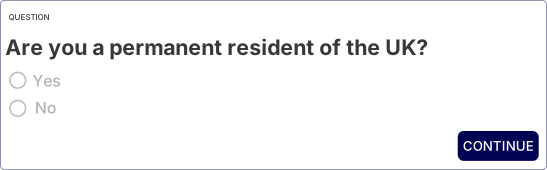
Question types roughly correspond to HTML form types. The supported types are:
RADIOCHECKBOXTEXTTEXTAREANUMBERCURRENCYDATEDATE_TIMEDECIMAL
Answering this question entails sending a POST request to the question endpoint.
/deals/{dealId}/applications/1/providers/{providerId}/compliance/demands-and-needs/questions/{questionId}
Body:
[
  {
    "id":"46458",
    "value":null
  }
]
Where the answer is an input field, the entered value should be provided in the value field.
Obtaining subsequent questions
Calling the "next question" endpoint will return another question to be surfaced to the user. The number of questions may vary as answering a question in a particular way could result in additional questions being asked.
/deals/{dealId}/applications/1/providers/{providerId}/compliance/demands-and-needs/questions/next
When no more questions are available, the endpoint will return HTTP 404.
Requesting the demands and needs summary
Calling the compliance summary endpoint returns a repetition of the questions and the answers,
along with a summary of product types and their eligibility, and the individual products related to
the question set. If a product type is not suitable for the customer, the status is NOT_SUITABLE.
{
  "status": "COMPLETED",
  "questions": [
    {
      "id": "21768",
      "type": "RADIO",
      "text": "Are you a permanent resident in the UK?",
      "answers": [
        {
          "id": "46458",
          "text": "Yes"
        },
        {
          "id": "46459",
          "text": "No"
        }
      ],
      "askedAt": "2022-06-22T14:36:09+00:00",
      "submittedAnswers": [
        {
          "id": "46458",
          "value": "Yes"
        }
      ],
      "answeredAt": "2022-06-22T15:09:03+00:00"
    }
  ],
  "productSummary": [
    {
      "insuranceProductType": "SMART",
      "status": "SUITABLE",
      "outcomeStatements": []
    }
  ],
  "products": [
    {
      "id": "10003399",
      "insuranceProductType": "SMART",
      "name": "SMART 30cm no Excess with pro rata refund / Bodyshop"
    }
  ],
  "createdAt": "2022-06-22T14:36:08+00:00",
  "completedAt": "2022-06-22T15:34:00+00:00"
}
In this example, only one question was asked. A question set would usually be comprised of many questions and answers.
Signing the demands and needs
The completed demands and needs may be sent to the customer for signing. To initiate this process, call
the signing endpoint using the POST method at:
/deals/{dealId}/applications/1/providers/{providerId}/compliance/documents/demands-and-needs/sign
If the customer is happy to sign the demands and needs electronically, indicate this in the request body as follows:
{
  "isManual": false
}
If the customer is not able to sign electronically, the demands and needs statement may be signed in-person. A reason must be given, which can be one of:
PRESENTED_MANUALLYCUSTOMER_HAS_NO_EMAILTECHNICAL_FAILURECUSTOMER_PREFERENCE
{
  "isManual": true,
  "reason": "CUSTOMER_PREFERENCE"
}
Opting out of compliance
If a customer does not wish to proceed with demands and needs or is not eligible to, an opt-out document may be issued and signed.
There is a list of valid opt out reasons available from the API. Currently the values below are accepted:
RETAILFLEETMOTABILITYEXPORT
To generate an opt-out document, make a POST request to the endpoint below.
/deals/{dealId}/applications/1/providers/{providerId}/compliance/documents/generate-opt-out-doc
{
  "disclaimerType": "EXPORT"
}
To initiate signing the document, make a POST request to the endpoint below.
If e-sign is refused or not possible, a reason may be given from the same list as
for demands and needs signing.
/deals/{dealId}/applications/1/providers/{providerId}/compliance/documents/opt-out-disclosure/sign
{
  "isManual": false
}